
Knot Folio logoKnot Folio
Busy season prep

Wedding Photography CRM Checklist: What to Set Up Before Busy Season

A launch checklist for wedding photography CRM setup, including inquiry stages, WhatsApp templates, booking reminders, payment workflows, and delivery handoffs.

Busy season exposes every weak spot in a wedding photography workflow. A CRM checklist helps teams prepare before inquiries, consults, shoot dates, payments, and delivery updates all start moving at once.

The best setup is practical: clear stages, saved templates, automated reminders, clean ownership, and enough reporting to see what is slipping before clients feel it.

Wedding CRM/2026-05-22/9 min read
Wedding photography CRM checklist covering lead stages, reminders, payments, and delivery.

What this guide covers

Wedding CRMChecklistBusy seasonPayments
Wedding photographers should prepare CRM stages and reminders before lead volume spikes.
WhatsApp templates, consultation rules, quote follow-ups, and payment milestones are checklist essentials.
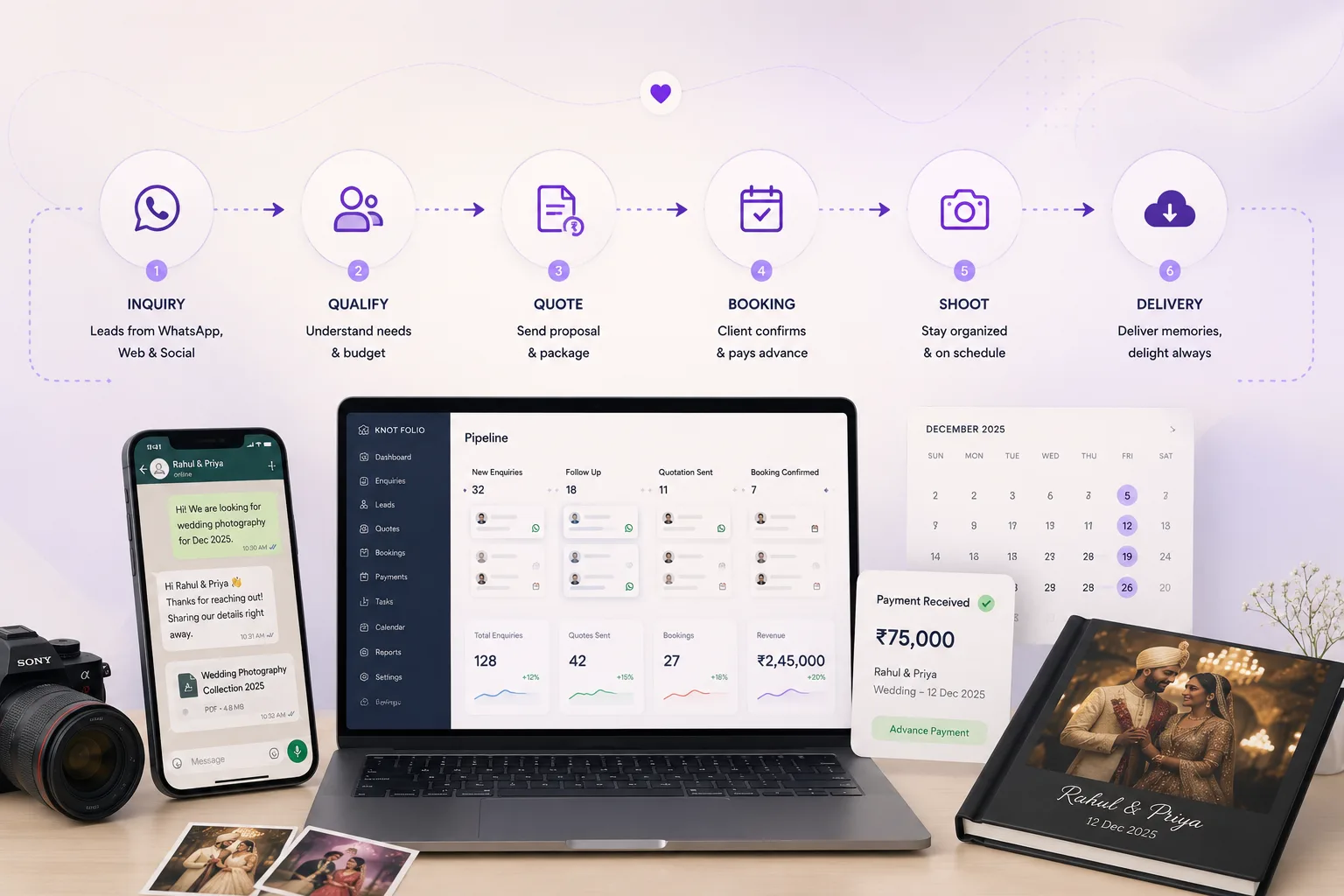
The CRM should support the full journey from inquiry to album delivery.
A pre-season audit reduces missed follow-ups, payment delays, and handoff confusion.

Start with a pre-season workflow audit

Before changing software settings, review the moments that created stress last season. Look for delayed first replies, missed brochure follow-ups, consult confusion, unclear payment ownership, or delivery updates that required too much manual chasing.

This audit shows which CRM setup work matters most. You are not trying to automate everything. You are trying to protect the highest-risk moments before volume increases.

A clear audit also makes onboarding easier because the team understands why each stage or reminder exists.

The essential wedding CRM checklist

Your checklist should cover the entire wedding journey, not just sales. The client experience begins with the inquiry and continues through planning, shoot readiness, payment collection, delivery, and album approvals.

Each stage needs a purpose, a responsible owner, and a clear signal for what happens next. The CRM becomes reliable when every repeated moment has a home.

  • Inquiry source, event date, venue, and package interest fields
  • WhatsApp templates for first reply, brochure follow-up, and consult reminder
  • Quote stages with scheduled follow-up timing
  • Deposit and balance payment reminders
  • Shoot preparation checklist and delivery status stages
This article is part of Knot Folio's CRM resource hub. You can continue with the feature library or review pricing and rollout options.

Make sure the team can use the system under pressure

A CRM that only the owner understands will break during busy weeks. Every person who touches clients should know how to read a lead record, update a stage, leave notes, and find the next action.

Keep the rules simple enough to follow when the team is tired. If the setup requires too much interpretation, people will fall back to WhatsApp memory and spreadsheets.

Busy season readiness is not about a perfect tool. It is about a system the team trusts when the calendar gets loud.

How Knot Folio helps teams prepare before busy season

Knot Folio gives wedding teams a clear place to set stages, reminders, and payment checkpoints before inquiries start piling up.

That preparation reduces missed follow-ups and makes it easier for the whole team to use the same workflow under pressure.

Next step

Bring the process into one place.

If this guide reflects the way your studio already works, explore the product features or compare plans on the pricing page.

Frequently asked questions

When should wedding photographers set up a CRM?

Ideally before busy season, when there is enough time to map stages, templates, reminders, and payment workflows without launch pressure.

What should be included in a wedding photography CRM?

Inquiry details, WhatsApp history, consultation tracking, quote follow-ups, payment reminders, shoot planning, and delivery updates should all be visible.

Can a CRM help with album delivery?

Yes. Delivery stages, approval reminders, and client updates can be tracked so post-shoot communication stays organized.

Build these workflows into your studio stack.

Knot Folio brings CRM structure, WhatsApp automation, and AI support together for photographer-led businesses.

Talk to Sales

No pressure. We will show the workflow first.

Chat on WhatsAppInstant demo help